

Landing Page Builder
Agent. Builds and checks the page.
New page, tracked from day one is a recipe in Ai1, the AI agent platform by MyZone AI, where several agents and skills work together to deliver one outcome. The Landing Page Builder researches and builds the page, the Analytics Setup Agent sets up and verifies tracking for its forms and clicks, and the Page Speed Monitor tests how fast it loads on phone and desktop. Nothing goes live until you approve.
How the recipe works
The page is built and checked, tracking is set up and verified, and the speed is tested. You approve the design and the staging page before anything goes live.
Landing Page BuilderLanding page build Analytics Setup AgentConversion tracking audit
 Page Speed MonitorPage speed check
No lost first weeks
Conversions are counted from the first visitor, not added after the launch.
Proof the tracking works
Each tag is checked on the live page and reported as a pass or a fail.
A fast start
You see how fast the page loads on phone and desktop, with the top fixes ranked.
At a glance
| Agents | Landing Page Builder, Analytics Setup Agent and Page Speed Monitor |
|---|---|
| Page types | Industry pages for a trade, and workshop pages built around registering |
| Tracked | Forms, phone and email clicks, bookings, downloads and key outbound links |
| Approvals | The design, then the page on the staging site |
| Goes live | Only when you say push it to live |
Tracking is often added weeks after a page launches, so the first visitors and the first leads are never counted and nobody can say what the launch delivered. This recipe sets up tracking and tests speed as part of the build, so the page is measured from the start.
How this differs from the Landing Page Builder on its own: the recipe adds tracking that is verified on the live page, and a speed test with ranked fixes.
How it works
A simplified view. You approve twice before anything goes live.
It researches the trade or topic, asks only what research cannot answer, and builds the page with any form or embed you need.
You review the built page and approve the design. Nothing moves on without your approval.
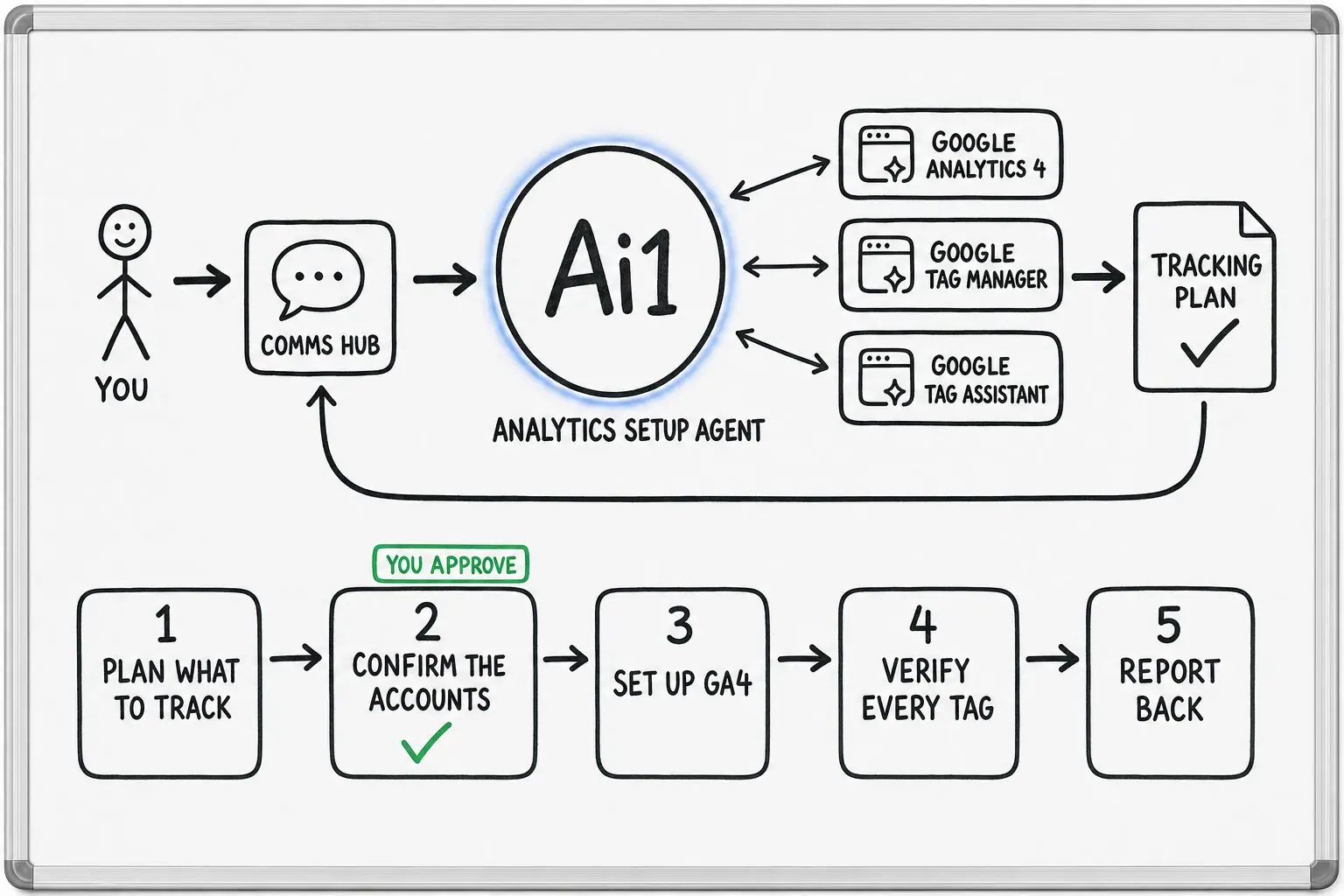
It maps the page goals to a tracking plan, confirms the GA4 property and Tag Manager container with you, then sets them up.
You review the page on the staging site and approve it separately.
Once you say push it to live, the page is published and every tag is checked on the live page, with a pass or fail for each.
It loads the page three times on a phone and three times on a desktop, and ranks what to fix first.
What one launch looks like
Example with a fictional business. Names and figures are invented to show the kind of result you get.
What it was asked: We need a page for our spring workshop, with sign-ups tracked from the first day.
| The page | A workshop page built around one register button, approved at design and again on staging. |
|---|---|
| Tracked | The registration form, phone clicks and email clicks, each set up as a conversion. |
| Verified | 3 of 3 tags pass on the live page, each sending the right data. |
| Speed | A B grade on a phone. Top fix: the hero photo is much larger than it needs to be. |
| Next | Approve the fix and it goes to the Webmaster, then a retest shows whether it helped. |
Built-in guardrails
Here is how the recipe keeps you in control.
Better together
The agents, skills and recipes behind this recipe.
Agent. Builds and checks the page.
Agent. Sets up and verifies the tracking.
Skill. Checks later that forms, calls and bookings are still counted.
Recipe. Keeps watching the page once it is live.
Common questions
The Landing Page Builder never publishes or deploys. The page goes live only after you approve the design, then the staging page, and say push it to live.
Forms, phone and email clicks, bookings, downloads and key outbound links, set up as Google Analytics 4 conversions through Google Tag Manager.
Every tag is checked on the live page. You get a summary of what is tracked, what was configured and a pass or fail for each event.
The lab test is an estimate. Only Google's real visitor data can say pass or fail, and the Page Speed Monitor tells you when a page has none.
We will build your next landing page with tracking and a speed test built in, and walk you through the results.