

Google Ads Agent
Agent. Leads the weekly review.
The weekly ads review is a recipe in Ai1, the AI agent platform by MyZone AI, where several agents and skills work together to deliver one outcome. The Google Ads Agent, the Analytics Setup Agent and the Media Buyer check your tracking, review the week's search terms, bidding and budget pacing, and hand you a fix list. A person on your team makes every change.
How the recipe works
Each agent does its own part with its own skill, in order. You approve the changes that matter, then the recipe runs again next week.
 Analytics Setup AgentConversion tracking auditGoogle Ads AgentSearch term clean-up
 Media BuyerBudget pacing check
Wasted spend caught weekly
Search terms that cost money without a lead are found within days, not at month end.
Decisions on real results
Every recommendation is checked against what happened on your site, not just clicks.
Your budget stays in your hands
You get a short list in priority order. A person on your team makes each change.
Ad accounts drift between reviews. Search terms wander, budgets run out by mid-afternoon and a broken tag hides the leads you do get. Most businesses only notice at the monthly report, after the money is spent. This recipe checks one account every week and hands you the fixes in order.
How this differs from the Google Ads Agent on its own: the recipe adds a tracking check first and a budget pacing check from the Media Buyer, so the fix list is judged on numbers you can trust.
How it works
A simplified view of what the agents do. You see the result and approve the changes that matter.
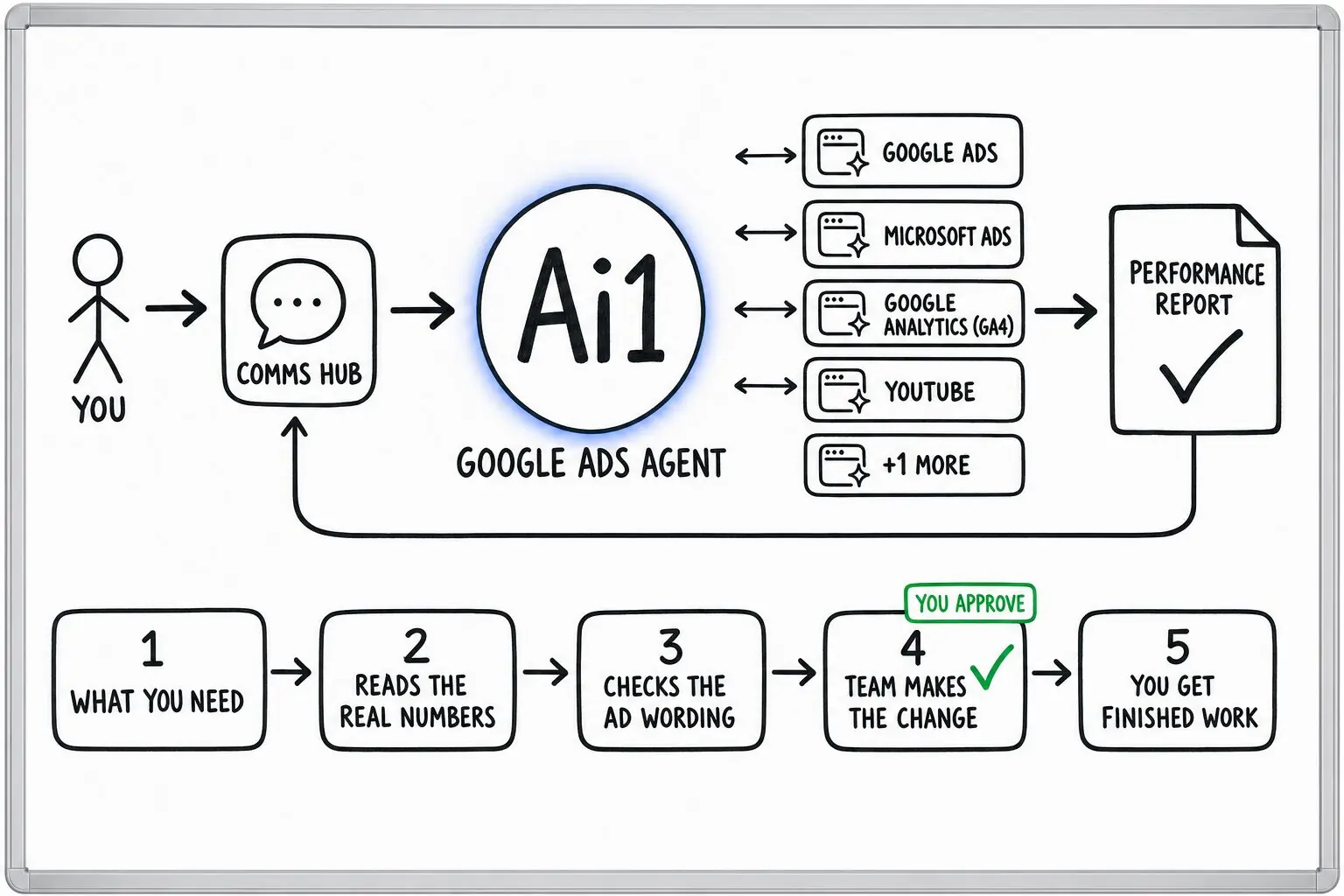
Before judging anything, confirm forms, calls and bookings are still being recorded.
Spend, clicks and leads from your Google Ads account, matched to what happened on your site in Google Analytics.
Review the search terms that spent money without a lead and list the negative keywords to add.
See whether the budget is on track for the month and whether bidding is healthy.
Check proposed ad copy for banned or unproven claims before it goes anywhere.
The changes in priority order, with the reason for each. Your team makes them in Google Ads.
Example weekly ads review
Example with a fictional business. Names and figures are invented to show the kind of output you get.
What it was asked: Where is our Google Ads money leaking this week, and what should we change first?
| Tracking | All counting. Forms, calls and bookings are all being recorded. |
|---|---|
| Budget pacing | On track for the month. |
| Wasted searches | Found. Searches like "free garage door parts" spent $184 this week with no call or quote. |
| Ad wording | Clear. No banned or unproven claims. |
Run it on a schedule
Set it up as a job and the same review runs every Monday without anyone asking for it. The same three agents do the work, and you still approve the fix list.
| Starts | A set time each week |
|---|---|
| Schedule | Every Monday, at a time you choose |
| Needs from you | View-only access to Google Ads and Google Analytics |
| You get | A fix list for one Google Ads account, in priority order |
| If it can't finish | A passing problem, such as a brief outage, gets a limited number of retries. If the run still cannot finish, it goes to the job's owner instead of looping. |
Built-in guardrails
Every Ai1 agent works under human approval. Here is how this recipe keeps you in control.
Better together
The agents and skills in this recipe, and where its results go next.
Agent. Leads the weekly review.
Agent. Checks the tracking first.
Skill. Step one every week.
App. Each fix lands on your task list with an owner.
Common questions
No. The Google Ads Agent reads your account view-only, and so do the Analytics Setup Agent and the Media Buyer.
Every campaign, budget, bid or keyword change is made by a person on your team, from the fix list the recipe hands you. Next week, the recipe checks whether each fix worked.
This recipe reviews Google Ads, matched to what happened on your site in Google Analytics.
The Google Ads Agent can also read Microsoft Advertising results, so Bing can sit beside Google in the same review.
The Meta Ads Agent reviews those separately and writes its own monthly report for Facebook and Instagram.
Both reports sit side by side in the monthly ads report, so you see all your ad spend in one place.
Yes. Each ad account gets its own weekly review and its own fix list.
Each client's data is kept separate, so an agency or a group of businesses can run it for several accounts without mixing them up.
We will run the first weekly review on your own Google Ads account and walk you through the fix list.