

Bookkeeper
Agent. Categorizes and reconciles your books.
Month-end close prep is a recipe in Ai1, the AI agent platform by MyZone AI, where several agents and skills work together to deliver one outcome. The Bookkeeper categorizes every line from the exports you upload and reconciles each account to exactly zero, then the CFO Agent reviews the close pack and explains what moved. A person approves every change and posts it in your accounting system.
How the recipe works
The Bookkeeper reconciles and preps, and the CFO Agent reviews. You approve, and a person posts in your accounting system.
BookkeeperBooks reconciliation CFO AgentMonth-end summary
Every account tied out
Each account matches the ledger to exactly zero, or the gap is listed as an exception. There is no plug figure.
Variances explained
The close pack says what moved and why, with each figure traced to its source.
Your books stay yours
Every change is a proposal a person approves. Closed months stay read-only.
At a glance
| Agents | Bookkeeper and CFO Agent |
|---|---|
| You upload | Bank and card statements and ledger exports, as files in chat |
| Reconciled | Each account to exactly zero, or an exception |
| You get | A close checklist and a close pack with the variances explained |
| Posting | Done by a person in your accounting system |
Month-end often means days of matching statements to the ledger before anyone can say what moved. This recipe does the categorizing and reconciling from the statements you upload, so the close starts from a finished pack and your time goes on the decisions.
How this differs from the CFO Agent on its own: the recipe adds the Bookkeeper, so the CFO Agent reviews a close that is already tied out line by line.
How it works
A simplified view. Every change to your books waits for a person.
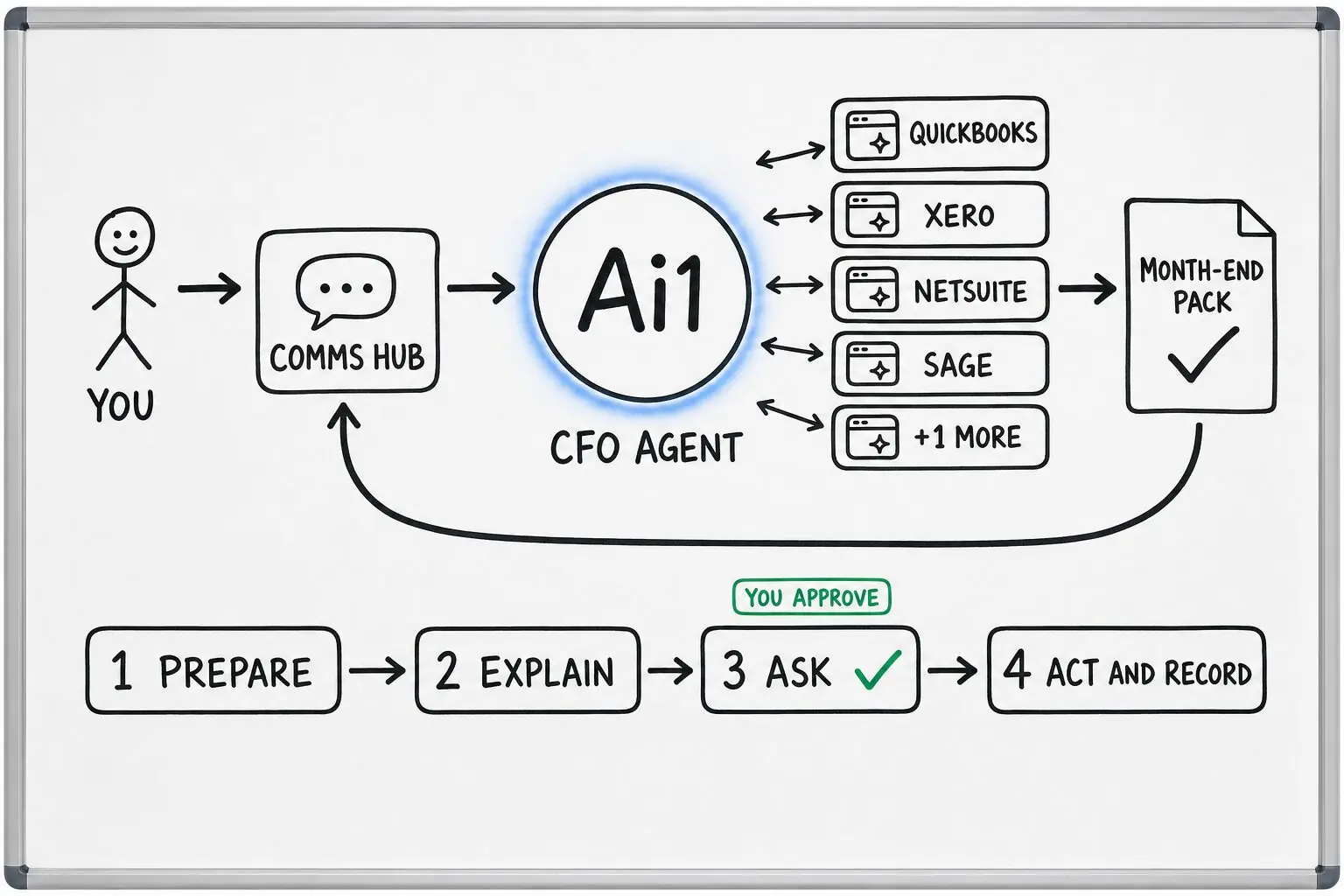
Bank, card and ledger exports, as files in chat.
Every line is categorized from rules and your past bookkeeping. Uncertain lines wait for your choice.
Each account is tied out to the ledger to exactly zero, or an exception is raised.
It runs the close checklist, lists anything still open and builds a private close pack. Missing entries and miscodes become proposals.
It reviews the pack, explains what moved and why, and prepares any adjustments for sign-off.
You approve each proposal and adjustment, and a person posts them in your accounting system.
What one close looks like
Example with a fictional business. Names and figures are invented to show the kind of close pack you get.
What it was asked: Are we ready to close March?
| Accounts | 3 of 3 tied out: two bank accounts and one card, each to exactly $0.00. |
|---|---|
| Timing item | A $480.00 supplier cheque has still to clear the bank, listed with its date. |
| Proposals | Two missing entries and one miscoded card payment, each waiting for your approval. |
| Variance | Flour costs up 12% on February, explained by a supplier price rise on the invoices. |
| Still open | One card receipt is missing, and the close checklist lists it. |
| Posting | Nothing posted. A person posts the approved entries in your accounting system. |
Built-in guardrails
Here is how the recipe keeps you in control.
Better together
The agents and skills behind this recipe.
Agent. Categorizes and reconciles your books.
Agent. Reviews the close and explains what moved.
Skill. Projects cash forward from your actual figures.
Skill. Ties each account to the ledger to exactly zero.
Common questions
No. Every change is a proposal. A person approves it and posts it in your accounting system.
Bank and card statements and ledger exports, uploaded as files in chat.
No. Tax questions go to the CFO Agent, which routes them to your human accountant. The CFO Agent does not file taxes, sign statements or give audit sign-off.
Closed months are read-only. A fix becomes a proposal dated in the current open month.
We will run close prep on your own exports and walk you through the first close pack.