

Operating Rhythm Coach
Agent. Checks your priorities and helps run the meeting.
The weekly scorecard is a skill in Ai1, the AI agent platform by MyZone AI. The Operating Rhythm Coach runs it before your leadership meeting: it reads your quarterly priorities, your finance sheet and any values you add in chat, compiles 13 weeks of trend and flags the numbers that are off track or out of date. It only reads: your team records any change.
A meeting that starts on the numbers
The scorecard is current before anyone walks in.
Trends, not one-week noise
Thirteen weeks side by side show what is slipping.
Honest gaps
A missing number is shown as missing, never as zero or on track.
At a glance
| Collects | Quarterly priorities, finance-sheet actuals and values added in chat |
|---|---|
| Compiles | 13 weeks of trend, with off-track numbers flagged |
| Marks | Out-of-date numbers, and missing ones as missing |
| When | A weekly refresh before your meeting, set up with your OK |
| Run by | The Operating Rhythm Coach |
| Never | Changes your plans or messages your team |
A scorecard is only useful if the numbers are current and someone owns each one. When it is filled in by hand, numbers go stale, blanks look like zeros and the meeting spends its first ten minutes arguing about data. The refresh puts sourced, dated numbers in front of the team, with the off-track ones ready for the issues list.
How this differs from the Operating Rhythm Coach as a whole: the agent also checks your quarterly priorities and helps run your meetings; this skill is the scorecard it keeps current.
How it works
Four steps, every week. It only reads your planning data.
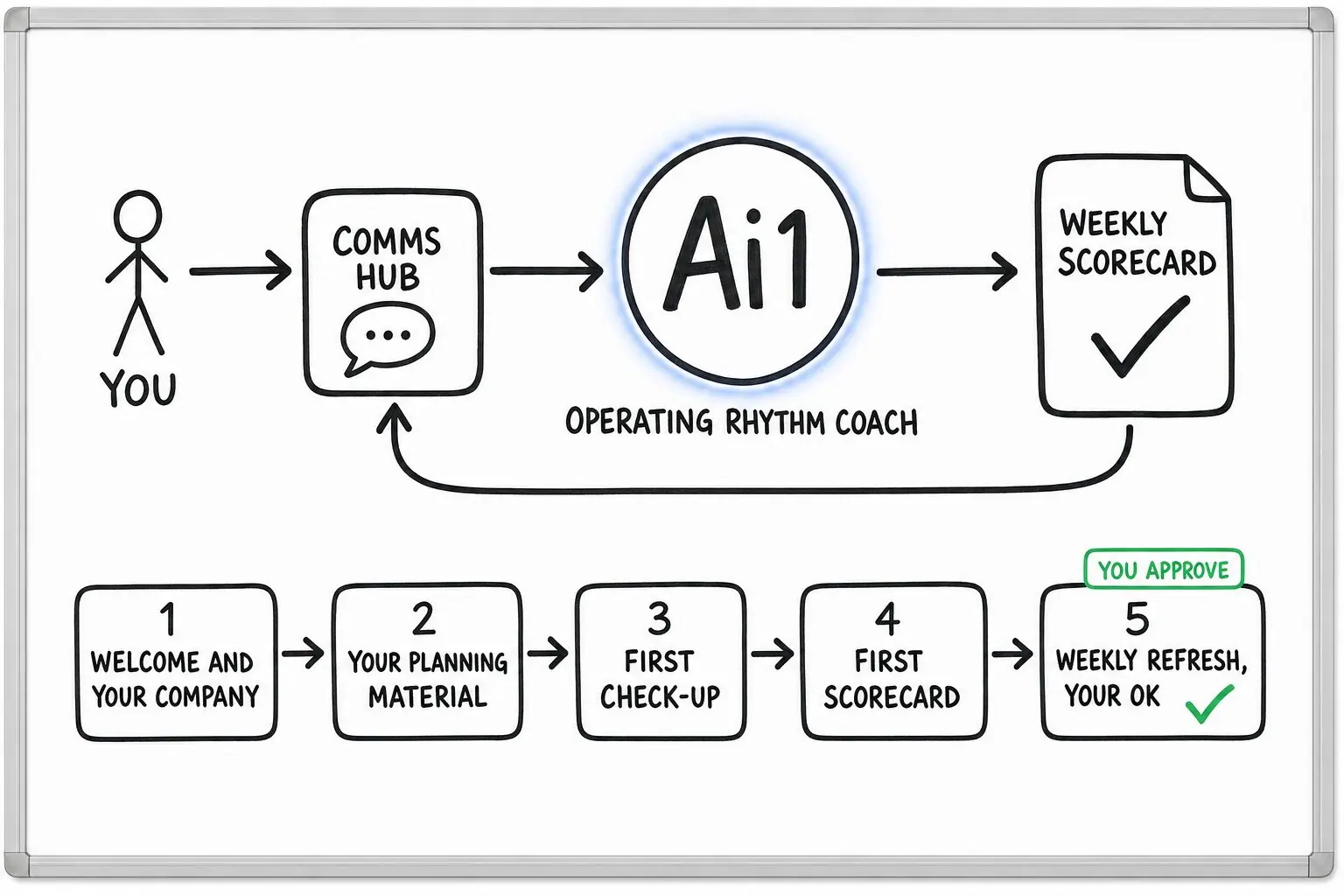
Collects this week's values from your planning tool, finance sheet and chat.
Each number is set against its goal over the last 13 weeks.
Off-track numbers become possible issues; stale ones are marked out of date.
Your leadership team decides what to act on, and records any change.
Example scorecard
Example with a fictional business. Names and figures are invented to show the kind of output you get.
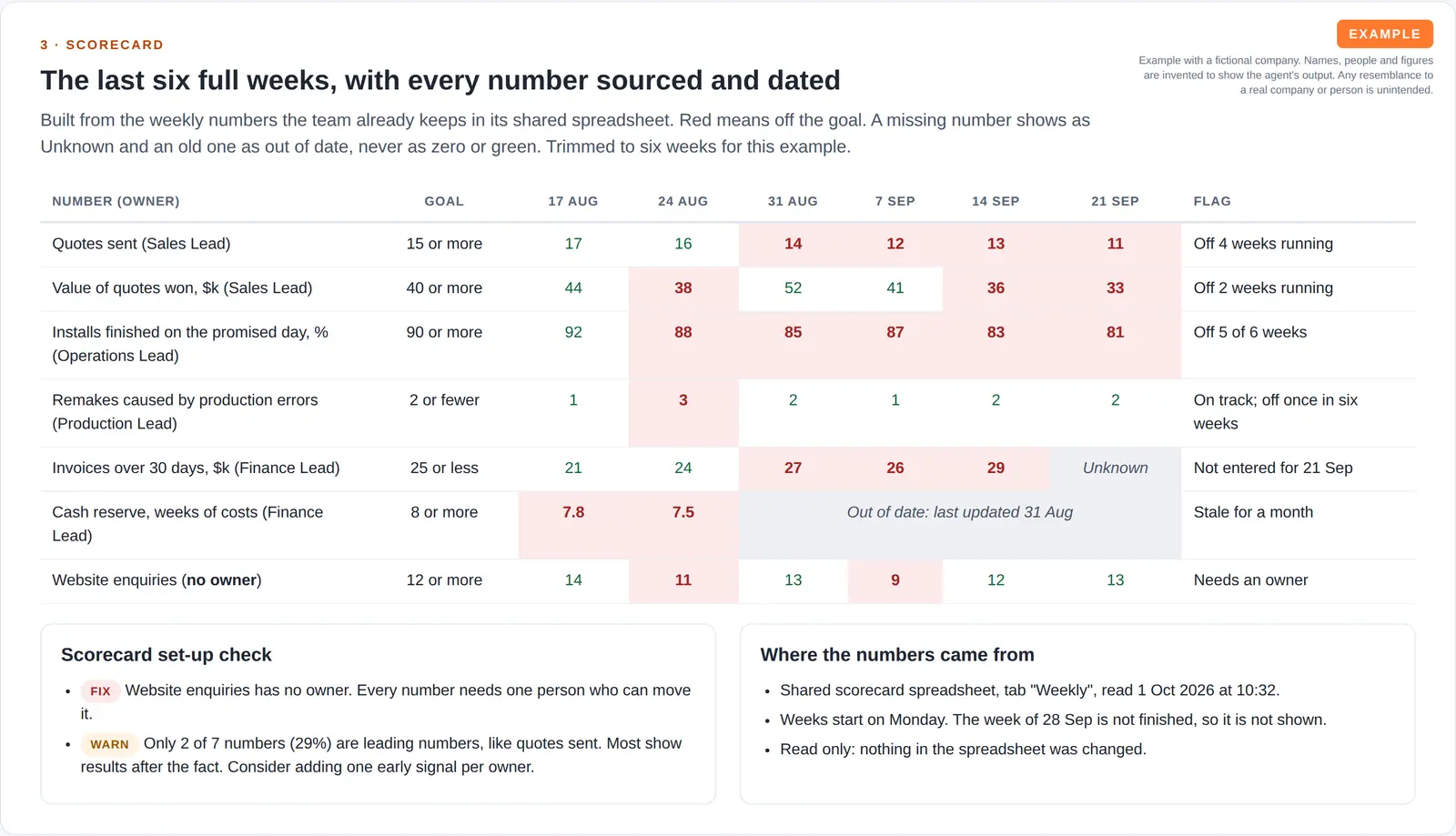
What it was asked: Q4 starts today: check our draft company priorities, show me the scorecard, and tell me how our operating rhythm is doing before Tuesday's leadership meeting.
| On-time installs | Below goal of 90% in 5 of the last 6 weeks, so it goes on Tuesday's issues list. |
|---|---|
| Quotes sent | Below goal four weeks running, so it joins the issues list too. |
| Cash reserve | Out of date. The figure is a month old, and website enquiries has no owner. |
Built-in guardrails
How the weekly scorecard stays honest and in your hands.
Better together
The agent that runs this scorecard, and the agents it works with.
Agent. Checks your priorities and helps run the meeting.

Agent. Chases to-dos and commitments after the meeting.

Agent. Gives quick, company-level scorecard answers by phone.

Agent. Decides which priorities and strategy matter most.
Common questions
Your quarterly priorities in your planning tool, actuals from your finance sheet and any values you add in chat. Every number carries its source and date.
It is shown as missing, never as zero or on track. Numbers that have not been updated are marked out of date.
No. It only reads. Every suggestion is a draft, and your team records any change it decides to make.
Tell us the numbers you track and we will show you the weekly scorecard.