

Meta Ads Agent
Agent. Runs the tune-up every week.
The Meta weekly tune-up is a job in Ai1, the AI agent platform by MyZone AI: a recipe that runs on a schedule. Every week the Meta Ads Agent reads your ad account through a read-only connection, looks at pacing, learning status, frequency and cost trends, and ranks the changes it suggests. A person on your team makes each change in Ads Manager.
Problems caught weekly
Pacing, learning and cost problems show up within the week, not at month end.
Worn-out ads replaced
When the same people see an ad too often and results slip, you get a refresh brief.
Every change stays yours
Each suggestion comes with its reasoning. A person on your team decides and makes it.
At a glance
| Starts | A set time each week |
|---|---|
| Schedule | Every Wednesday, at a time you choose |
| Needs from you | View-only access to your ad account, plus any Events Manager exports you share |
| You get | A ranked change list for your team, and a refresh brief for any worn-out ad |
| If it can't finish | A passing problem, such as a brief outage, gets a limited number of retries. If the run still cannot finish, it goes to the job's owner instead of looping. |
| Agent | Meta Ads Agent |
| Looks at | Pacing, learning status, frequency and cost trends |
| Figures from | Your ad account, your exports and your analytics only |
| Changes | Made by a person on your team in Ads Manager |
Facebook and Instagram delivery shifts between reviews. An ad set stuck in learning, a budget that runs ahead of plan and an ad the same people have seen too often all cost money quietly. A weekly look catches them while they are still small.
How this differs from the Meta Ads Agent on its own: the job runs the review on a fixed day each week, so your team gets the list without asking for it.
How it works
A simplified view. It recommends; your team makes each change.
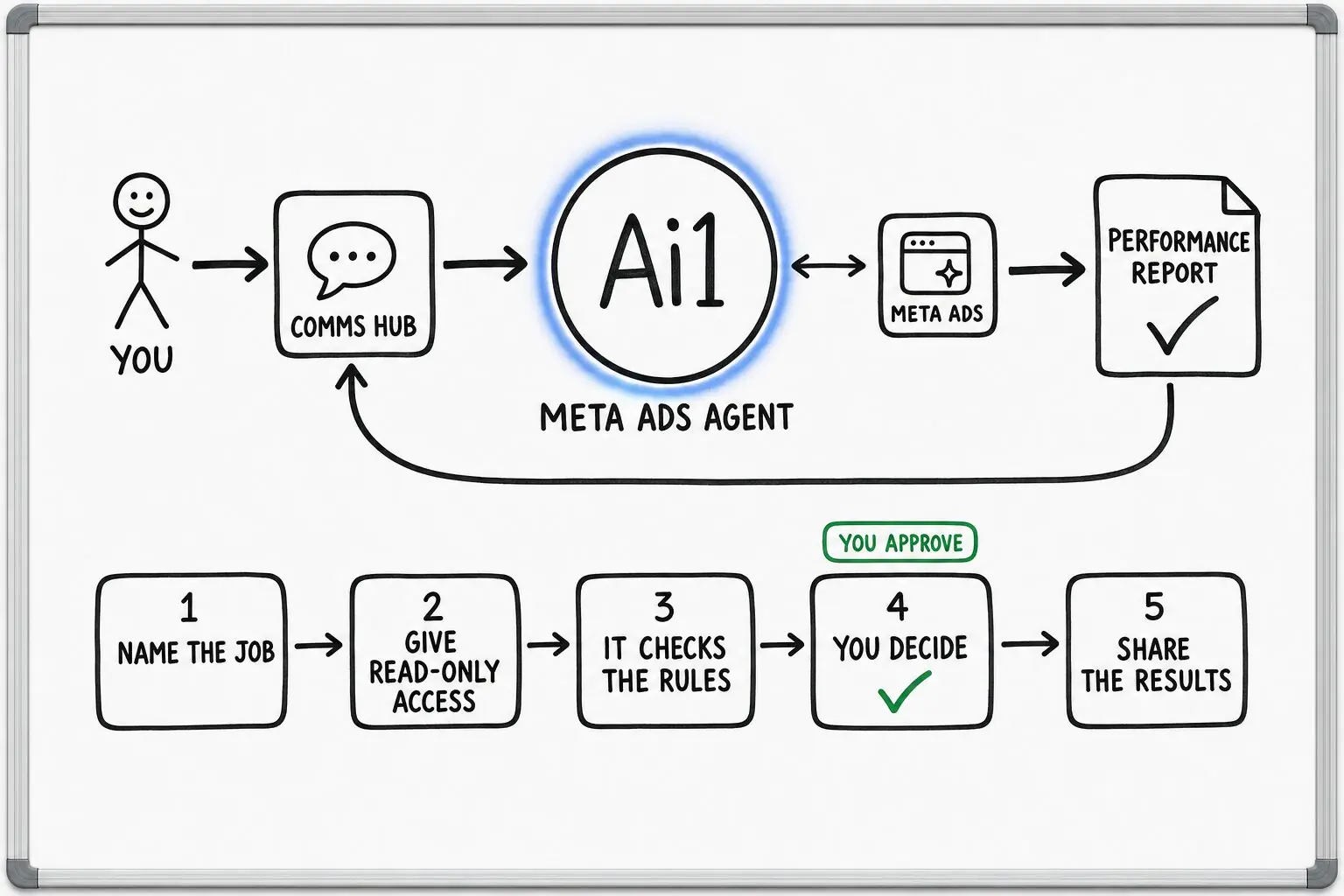
Pulls the week's campaign, ad set and ad results through its read-only connection.
Looks at whether budgets are on pace and which ad sets are still stuck in learning.
Flags ads the same people see too often while results slip, and writes a refresh brief with new concepts, hooks and formats.
Puts the changes it suggests in order, each with the reason behind it.
A person on your team approves and makes each change.
What you get every week
Example with a fictional business. Names and figures are invented to show the kind of list you get.
What it was asked: What should we change in our Facebook and Instagram ads this week?
| Pacing | On pace on the two campaigns for new customers. The budget for past visitors ran out by Thursday. |
|---|---|
| Learning | 7 of 12 ad sets are still in learning, each with too few purchases to settle. |
| Worn-out ad | The best garden chair ad now reaches the same people four times a week, and its cost per purchase is up by half in three weeks. |
| Fix first | Combine the smallest ad sets, so each one gets enough purchases to leave learning. |
| Refresh brief | Three new angles for the garden chair ad, with hooks and formats to test. |
| Who changes it | A person on your team, in Ads Manager. |
Built-in guardrails
Here is how the weekly tune-up keeps you in control.
Better together
The agents, skills and recipes behind this job.
Agent. Runs the tune-up every week.

Agent. Turns a refresh brief into new ad designs.
Skill. Screens ad wording for risky claims.
Recipe. Puts the month's Meta results next to your other ads.
Common questions
No. It reads your ad account through a read-only connection and cannot change campaigns.
Each week it recommends changes with its reasoning. A person on your team approves and makes each one in Ads Manager.
View-only access to your ad account: you add MyZone's business portfolio as a partner with view-only access. Events Manager detail comes from the exports or screenshots you share.
A short brief for replacing a worn-out ad, with new concepts, hooks and formats to test. Your team or the Ad Creative Agent turns it into new ads.
Yes. You choose the day and the time. The day on this page is an example.
We will run the tune-up on your own ad account and walk you through the first list.