The Challenge: Email Overload
Inbox Chaos
Thousands of emails pile up daily. Newsletters, notifications, newsletters, and one urgent client message buried somewhere. You spend 30+ minutes daily just sorting.
Priority Blindness
Everything looks equally important. You miss critical client emails while responding to marketing promotions. Context switching kills productivity.
Repetitive Responses
40% of your emails are routine questions you answer the same way every time: "When is the meeting?" "What's the status?" "Can you send the file?"
Follow-Up Failures
Emails get buried. You forget to follow up with leads, team members, and clients. Opportunities slip through the cracks.
Multi-Agent Workflow
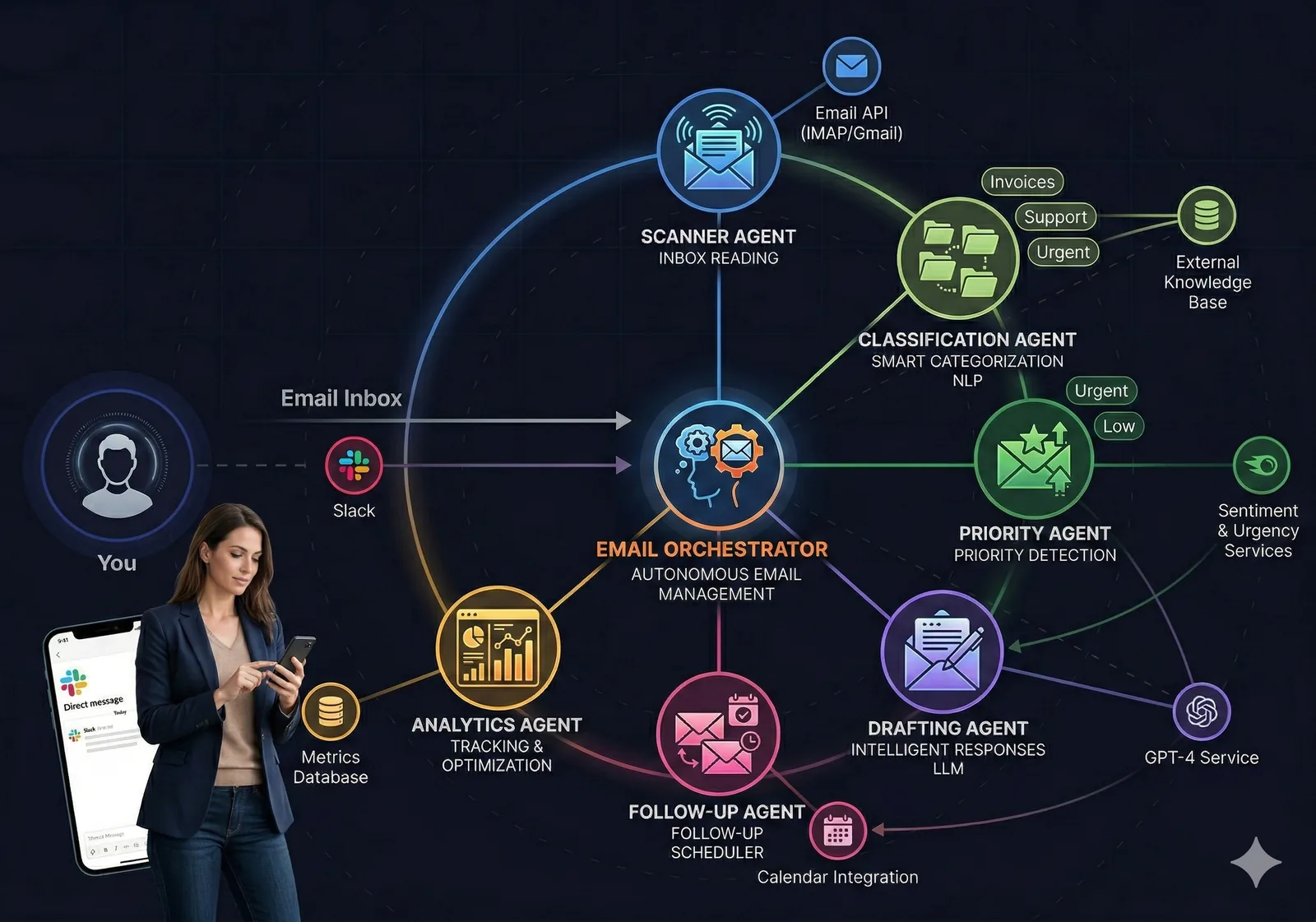
Four specialized agents work together to clear your inbox and keep you focused on what matters.
Scanner
Agent
Classifier
Agent
Composer
Agent
Tracker
Agent
How It Works: Step-by-Step
Inbox Scanner Agent Reads Everything
The agent reads incoming emails continuously, extracting key information: sender, subject, body, attachments, and urgency signals. It captures everything you need without missing a message.
Priority Classifier Agent Ranks by Importance
The agent categorizes: High (urgent client/VIP/deadline), Medium (team/routine business), Low (newsletters/notifications). You review rankings weekly and train the agent to match your priorities. No important email gets missed.
Draft Composer Agent Writes Smart Responses
For routine questions, the agent drafts replies using your voice and knowledge base. "When is the meeting?" gets answered with the actual date from your calendar. You review, approve, and send in 10 seconds — or ask it to rewrite.
Follow-Up Tracker Agent Ensures Nothing Falls Through
The agent tracks sent emails and reminds you if no response arrives by a deadline you set. "Client waiting 3 days on proposal" gets flagged. You never miss an opportunity again.
Your Day: Before & After
Before: 7:00–8:00 AM
-
7:00 AM
Open inbox: 347 unread messages -
7:10 AM
Scroll through newsletters, promotions, notifications — looking for actual work -
7:25 AM
Find 3 high-priority emails buried: client question, team request, deadline reminder -
7:30–8:00 AM
Write routine responses manually. "When is the meeting?" "Can you send the file?" -
8:00 AM
Coffee is cold. Inbox still has 200+ unread. Anxiety about what you missed.
After: 7:00–7:10 AM
-
7:00 AM
Open Ai1 dashboard. 8 high-priority emails highlighted. Rest auto-categorized. -
7:01 AM
Review 3 auto-drafted responses. One needs adjustment. Approve two in 5 seconds. -
7:05 AM
Skim high-priority summaries. Client question answered in draft. Team has status. Deadline noted. -
7:08 AM
Approve & send all replies. Inbox updated. Follow-ups scheduled. -
7:10 AM
Coffee still hot. Inbox cleared. Rest of day: actual work. Zero anxiety.
Case Study: Consulting Firm COO
ROLE
Chief Operations Officer
CHALLENGE
Spending 2+ hours daily in email; missing urgent items
Approach: Deployed all 4 agents. Inbox Scanner read 400+ daily emails. Priority Classifier learned to surface the 12-15 that actually mattered. Draft Composer handled 60% of routine questions automatically. Follow-Up Tracker flagged proposals waiting for decisions.
Timeline: Full implementation 1 week; productivity gains realized immediately.
Daily email time savings
Proposals recovered (near deadline)
Urgent emails surfaced
Key Features
Automated Triage
Every incoming email is instantly read, categorized, and flagged. You see only what matters.
Smart Categorization
High priority, medium, low, newsletters, notifications — trained on your preferences.
Intelligent Responses
AI drafts replies to routine questions with your voice and tone. You approve in seconds.
Follow-Up Tracking
Never forget. The agent reminds you if emails don't get responses within your deadline.
Calendar Integration
Draft replies include dates from your calendar. No more back-and-forth about scheduling.
Knowledge Base Learning
The agent learns from your docs, FAQs, and past emails to draft more accurate responses.
Humans in the Loop
You always make the final call. Nothing sends without your approval.
Daily Priority Review
You scan the classified emails each morning. Tell the agent if it got priorities wrong — it learns from your feedback.
Draft Approval
You read all AI-drafted replies before they send. Edit, rewrite, or approve in seconds. Your voice, your responsibility.
Follow-Up Decision Making
The agent flags overdue emails. You decide if it's a real priority or can wait. You own your time.
Weekly Agent Tuning
You provide feedback on misclassifications. The agent improves weekly. Your preferences shape how it works.
I was spending 90 minutes every morning in email. Now it's 15 minutes. The AI handles the routine stuff, I see only the important emails, and nothing falls through the cracks. This has been transformative.
Sarah Mitchell
Chief Operations Officer, Consulting Firm
Expected Results After 30 Days
Less daily email time
Urgent emails surfaced
Faster response time
Missed follow-ups
Ready to Clear Your Inbox?
Book a free consultation. We'll show you what your inbox looks like with AI.